
Quantity takeoff that lives inside Excel.
Measure areas, lengths and counts directly from PDF, DWG, DXF and TIF drawings. Every quantity writes back as an Excel formula, ready for your bill of quantities. No exports, no copy and paste, no separate database.
$799 then $199 a year, or $400 a year to rent. Full pricing
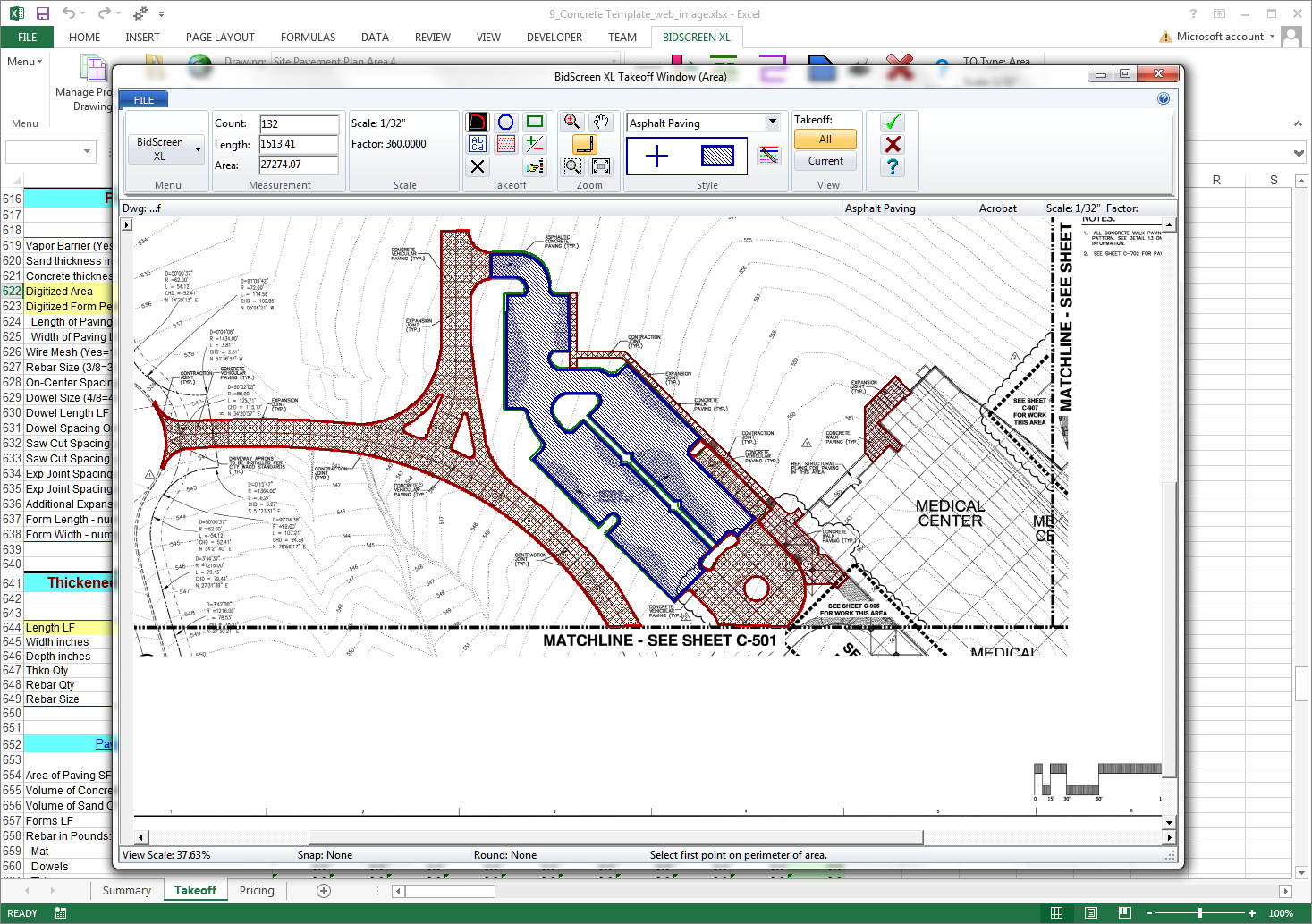
A new ribbon tab on the Excel you already have.
BidScreen XL installs in seconds and shows up next to Home, Insert and Formulas. Same Excel, same workbook, same keyboard shortcuts. Your QSs and estimators keep the software they know and gain a takeoff toolbar.
- Native Microsoft Excel add in (.xlam)
- Excel 2016 and later, 32 bit or 64 bit
- All measurements stored inside the workbook
- Compatible with Excel on Microsoft 365 desktop

=BidScreen.Area("Slab-01")Bring whatever the design team sends.
Open vector and raster sources side by side. Calibrate scale per sheet, bookmark sheets by trade, and snap measurements to vector edges when they exist. PDF stays a PDF, no flatten, no convert.
- PDF (vector + raster), DWG, DXF, TIF
- Per-sheet scale calibration
- Drawing Manager with bookmarks + sheet groups
- Cloud-storage compatible (OneDrive, SharePoint, Dropbox)
Area, length, count. Plus masks for the openings.
Trace areas, measure straight sections or continuous paths along walls, and count symbols by pattern. When a slab has openings, drop a negative mask and the area subtracts the void without redrawing the outline.
- Area takeoff calibrated per sheet
- Section length for straight runs, continuous length for multi-segment paths
- One click per symbol for counts
- Negative masks subtract openings from any area takeoff
- AreaSquare metres on a metric scale, square feet on an imperial one, calibrated per sheet.
- Section lengthStraight runs, point to point.
- Continuous lengthMulti-segment paths along walls and perimeters.
- CountOne click per symbol type. BidScreen does the tally.
- Negative maskCut openings out of an area takeoff, voids subtract automatically.
Every measurement is an Excel formula.
Cell B2 reads =BidScreen.Area("Slab-01"). Change the takeoff on the drawing and the cell updates. Your rates, conditional formatting and pivot tables stay intact, so the BoQ stays live. No black-box database, no proprietary export.
- Measurements stored as named formulas, not values
- Auditable cell history, easy QC for senior estimators
- Compatible with macros, conditional formatting, pivots
- Templates for concrete, roofing, painting, and earthwork
=BidScreen.Area("Slab-01")18,240 SF=BidScreen.Linear("Perimeter-Beam")820 LF=BidScreen.Count("Footing-Pad")24 EA=B2*D2$76,608Runs on the PC your QSs and estimators already use.
- Operating system
- Windows 10 (64 bit recommended)
- Windows 11
- Microsoft Excel
- Excel 2016, 2019, 2021, or Microsoft 365
- 32 bit or 64 bit (matches your Excel install)
- Hardware
- 4 GB RAM minimum (8 GB recommended)
- 500 MB disk space
- Drawing inputs
- PDF (vector + raster), DWG, DXF, TIF
Buy perpetual, or rent by the year.
All features in both. No subscription trap, no per-seat surcharge. Concurrent License Manager is available if you need floating licences across several seats (3-licence minimum, see pricing). Prices are in US dollars.
Buy once. Year 1 of Full Serve included.
- All features, no time limit
- Year 1 of Full Serve included
- Use on your Excel as long as you license it
- Move the license between machines via the portal
Lower entry price for seasonal estimators or short term bids. Bundles Full Serve while the rental is active.
- All features for the rental term
- Full Serve bundled while active
- Convert rental to perpetual any time
- Cancel before renewal, no auto charge
Questions QSs and estimators ask about BidScreen XL.
The full library lives at /support/faqs. Or browse every feature in the interactive training catalog.
Try the full BidScreen XL for 14 days.
All features unlocked. No credit card. Convert to perpetual or rent whenever the tender you’re working on calls for it.