
-
800.989.4243
(US and Canada)
-
214.340.9436
Make A Call
Vertigraph is dedicated to providing affordable, easy to use quantity takeoff software for the construction industry.
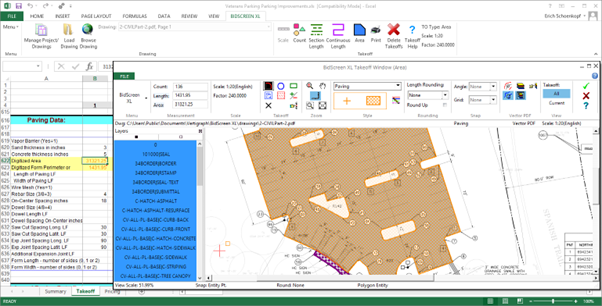
Accurate, fast, and organized takeoffs are critical for construction projects. That’s why contractors and estimators rely on quantity takeoff software like BidScreen XL by Vertigraph, Inc. This Excel add-in transforms the way professionals measure, record, and manage construction takeoffs. It’s designed to streamline your workflow, reduce errors, and let you work directly in Excel without switching programs. With BidScreen XL, every measurement is precise, every project stays organized, and estimators can focus on delivering reliable results rather than dealing with tedious manual calculations.
BidScreen XL installs as an Excel tab, giving users a dedicated ribbon to access all commands. The interface is simple: you can measure areas, lengths, and counts directly in your workbook. Settings are easily defined through the Setup menu, and context-sensitive help ensures you never lose track of your workflow. You no longer need to export data from one program to another; everything happens in Excel, saving time and effort.
This integration also reduces the learning curve for teams already familiar with Excel. Contractors don’t have to spend hours training on a new platform or worrying about compatibility issues. Every measurement, calculation, and annotation stays within one workbook, making tracking and auditing simple and transparent.
The software supports all major raster and vector file types, including PDF, DWG, DXF, and TIF. Whether it’s a single-page or multi-page file, BidScreen XL lets you load one page, multiple pages, or an entire folder of files at once. Vector files allow snapping to specific points and isolating layers for precise measurements. These features ensure accuracy while keeping the workflow simple, even for large and complex projects.
By working directly with original drawings, BidScreen XL eliminates the risk of errors caused by file conversion. Whether handling digital architectural plans or detailed engineering schematics, the software maintains measurement accuracy. This capability is particularly important when working on large-scale construction projects, where even minor discrepancies can lead to costly mistakes.
With BidScreen XL, measurements go beyond basic takeoffs. You can calculate areas, perimeters, curb lengths, and cross-section volumes effortlessly. The Auto Scale feature calibrates drawings quickly, while shortcut keys simplify curves, circles, and continuous lengths. Each recorded measurement is color-coded in Excel with a visible red cell comment indicator, making it easy to track and audit data.
For example, measuring the area of light-duty paving or the length of curbs becomes straightforward. Simply select the desired measurement type, record it in Excel, and the software automatically calculates the related perimeter or total. This precision allows estimators to present detailed, accurate proposals to clients with confidence.
Keeping multiple drawings organized can be challenging, but BidScreen XL’s Drawing Manager makes it easy. You can annotate, describe, and organize every drawing in one place. Move points, edit takeoff measurements, and apply custom line styles, symbols, and fill patterns for clarity. Every change is saved directly in Excel, maintaining a complete audit trail without cluttering your workflow.
This feature ensures that no detail gets overlooked. You can isolate layers, hide unwanted elements, and focus on specific areas of a drawing without losing context. The organized structure provided by the Drawing Manager reduces errors and improves collaboration between team members by keeping all project information in a single, accessible location.
BidScreen XL comes with sample estimating templates for concrete, roofing, painting, and other trades. These templates make it easy to start measuring immediately without setting up new workbooks. Customizable visual markers, colors, and line patterns provide clarity and help differentiate project elements. This makes it an ideal solution for estimators managing multiple trades on a single project.
Many contractors integrate their building estimating software to ensure that takeoffs and estimates remain accurate and aligned across all project phases. This combination allows estimators to input measurements directly into their cost models, reducing duplication of effort and ensuring faster turnaround on bids.
Large projects often involve multiple team members. BidScreen XL allows files to be stored on cloud drives, ensuring that your team can access, update, and review measurements from anywhere. Live updates keep everyone on the same page, reducing errors caused by miscommunication and improving project efficiency.
This capability is particularly useful for companies managing multiple sites or remote teams. Team members can work on the same set of drawings simultaneously, and all updates are saved in real-time. This ensures accuracy and prevents the duplication of work, which often leads to delays and errors.
BidScreen XL is tailored for contractors, subcontractors, and estimators. It simplifies on-screen measurement, handles multiple scales for cross sections, and stores all calculations in Excel. No conversions are needed, and there is no need for multiple programs. Its flexibility ensures it works for both small teams and large-scale construction projects.
The software is built to reflect real-world workflows, allowing users to measure, annotate, and calculate in ways that mirror actual construction site requirements. Estimators can focus on planning and bidding with confidence, knowing that every figure is accurate and easy to track.
At Vertigraph, Inc., we built BidScreen XL to make estimating faster, easier, and more accurate. Our tool gives construction professionals the confidence that every measurement is correct and every estimate is clear. From managing multiple files to applying visual markers, the software helps teams save time while keeping data organized. For contractors seeking reliable software for construction company operations, BidScreen XL delivers measurable results.
Take control of your construction takeoffs today. With BidScreen XL, you can simplify measurement, reduce errors, and improve project efficiency; all directly within Excel.
BidScreen XL is an Excel add-in that simplifies quantity takeoffs and construction measurements.
It works with PDF, DWG, DXF, TIF, and both raster and vector drawing files.
Yes, the Drawing Manager organizes drawings, annotations, and measurements efficiently for multiple files.
Yes, it can work alongside building estimating software for accurate cost estimation.
Absolutely, it includes templates for concrete, roofing, painting, flooring, and other subcontractor trades.